Home

Main navigation

  • News
    • All news
    • Seminars
  • Presentation
    • CREATIS
    • Organigram
    • People directory
    • Staff
    • Contacts
    • Access
  • Research
    • Research teams
    • Transversal projects
    • Structuring projects
    • Imaging platform
    • Activity reports
    • Data information note
  • Contributions
    • Publications
    • Patents
    • Software
    • Challenge organization
  • Studies & Training
    • Implications dans les formations
    • Doctoral Studies
  • Jobs Opportunities
  • French French
  • English English
Search API form
User account menu
  • Account
    • Log in

Breadcrumb

  1. Accueil
  2. Windows Parameter Configuration

Windows Parameter Configuration

creaContours home page > End-User Guide > Basic interface options > Windows Parameter Configuration

Windows Parameter Configuration

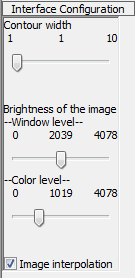
The interface configuration panel is composed by three main elements: contour width sider, window level slider and the color level slider. There is a image interpolation check box as well.

  • Contour width: Move the slider in order to modify the thickness off all contours.
  • Window level: Move the slider in order to change the brigtness of the image (a higher level means a darker image)
  • Color level: Move the slider to change the brightness of the colors (a higher level means brighter colors and less contrast)
  • Image Interpolation: Deactivating this option causes the image to lose resolution, as it is not interpolated.
Interface Configuration panel

Back

Barre liens pratiques

  • Authentication
  • Intranet
  • Rss feed
  • Creatis on Twitter
  • Webmail
Home

Footer menu

  • Contact
  • Map
  • Newsletter
  • Legal Notices